

👍 Contribute Benchmark#
As the official evaluation tool of ModelScope, EvalScope’s benchmark evaluation functionality is continuously being optimized! We warmly invite you to reference this tutorial to easily add your own benchmark evaluation and share your contributions with the community. Let’s help EvalScope grow together and make our tool even better!
Below, we take MMLU-Pro as an example to introduce how to add a benchmark evaluation, which mainly includes three steps: uploading a dataset, registering a dataset, and writing an evaluation task.
1. Prepare Benchmark Evaluation Dataset#
You have two ways to prepare the benchmark evaluation dataset:
Upload to ModelScope (Recommended): Upload the dataset to the ModelScope platform, allowing other users to load your dataset with a single click. This is more convenient and allows more users to benefit from your contribution.
Use Locally: You can also directly use the local dataset for evaluation, suitable for situations where the dataset is still in development or contains sensitive information.
See also
For uploading to ModelScope, please refer to: modelscope/MMLU-Pro example, and dataset upload tutorial.
Regardless of which method you choose, please ensure the data format is correct and can be loaded. If using ModelScope, you can test with the following code:
from modelscope import MsDataset

dataset = MsDataset.load("modelscope/MMLU-Pro")  # Replace with your dataset
If using a local dataset, you need to adjust the dataset_id parameter and rewrite the load_from_disk method when registering the benchmark evaluation.
2. Register Benchmark Evaluation#
Add a benchmark evaluation in EvalScope.
Create File Structure#
First, Fork EvalScope repository, creating a copy of the EvalScope repository for yourself, and then clone it locally.
Then, add the benchmark evaluation in the evalscope/benchmarks/ directory with the following structure:
evalscope/benchmarks/
├── benchmark_name
│   ├── __init__.py
│   ├── benchmark_name_adapter.py
│   └── ...
Specifically for MMLU-Pro, the structure is as follows:
evalscope/benchmarks/
├── mmlu_pro
│   ├── __init__.py
│   ├── mmlu_pro_adapter.py
│   └── ...
Register Benchmark#
We need to register Benchmark in benchmark_name_adapter.py so that EvalScope can load our added benchmark test. Taking MMLU-Pro as an example, the main contents include:
Import
BenchmarkandDataAdapterRegister
Benchmark, specifying:name: Benchmark test namepretty_name: Readable name of the benchmark testtags: Benchmark test tags for classification and searchdescription: Benchmark test description, can use Markdown format, recommended in Englishdataset_id: Benchmark test dataset ID for loading the benchmark test datasetmodel_adapter: Default model adapter for the benchmark test. Supports two types:OutputType.GENERATION: General text generation model evaluation, returning the text generated by the model through input promptsOutputType.MULTIPLE_CHOICE: Multiple-choice question evaluation, calculating option probabilities through logits, returning the option with the highest probability
output_types: Benchmark test output types, supports multiple choices:OutputType.GENERATION: General text generation model evaluationOutputType.MULTIPLE_CHOICE: Multiple-choice question evaluation output logits
subset_list: Subdatasets of the benchmark test datasetmetric_list: Evaluation metrics for the benchmark testfew_shot_num: Number of In Context Learning examples for evaluationtrain_split: Training set of the benchmark test for sampling ICL exampleseval_split: Evaluation set of the benchmark testprompt_template: Benchmark test prompt template
Create
MMLUProAdapterclass, inheriting fromDataAdapter.
Tip
The default subset_list, train_split, eval_split can be obtained from the dataset preview, for example, MMLU-Pro preview
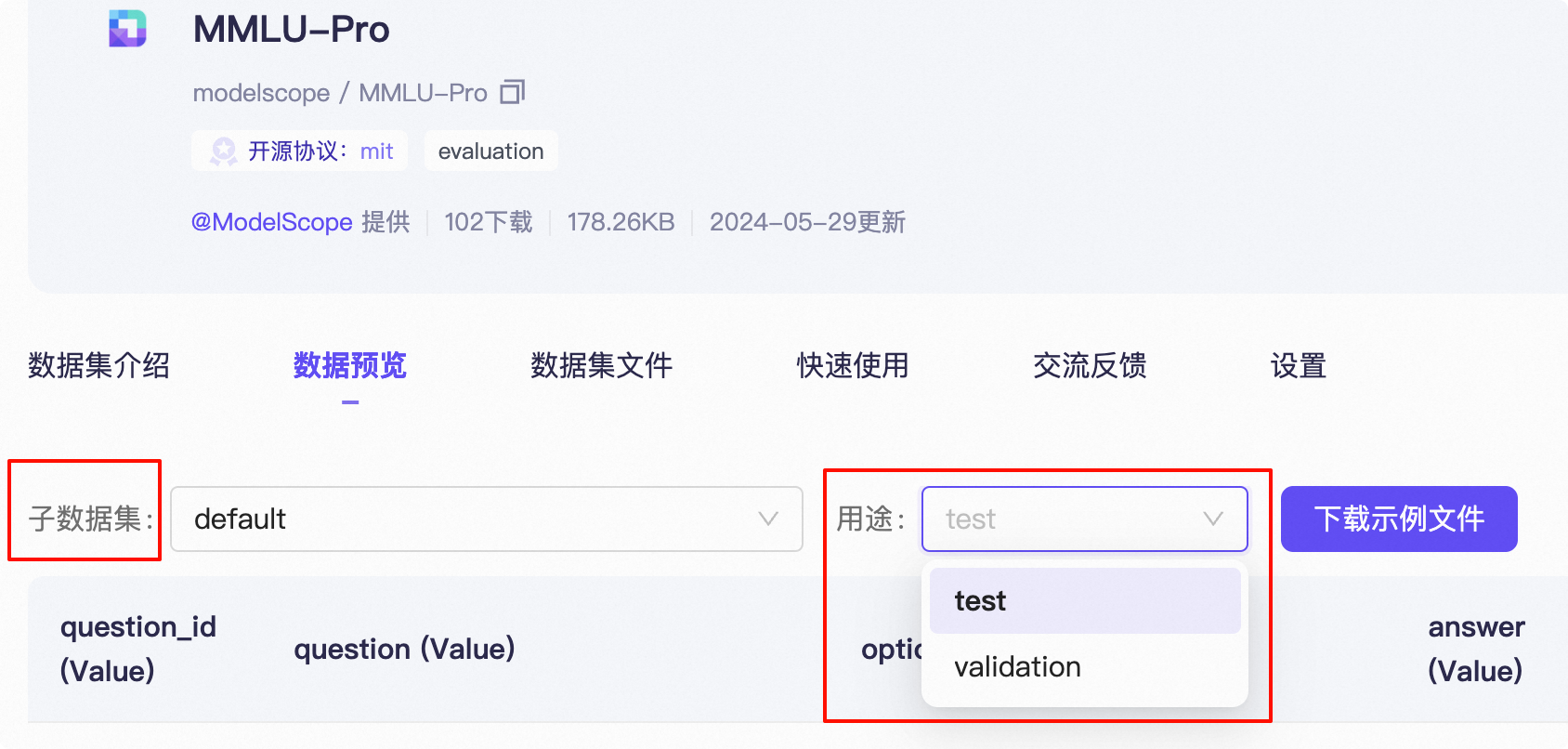
Example code is as follows:
from evalscope.benchmarks import Benchmark, DataAdapter
from evalscope.constants import EvalType, OutputType

SUBSET_LIST = [
    'computer science', 'math', 'chemistry', 'engineering', 'law', 'biology', 'health', 'physics', 'business',
    'philosophy', 'economics', 'other', 'psychology', 'history'
]  # Custom subset list

@Benchmark.register(
    name='mmlu_pro',
    pretty_name='MMLU-Pro',
    tags=['MCQ', 'Knowledge'],
    description=
    'MMLU-Pro is a benchmark for evaluating language models on multiple-choice questions across various subjects. It includes questions from different domains, where the model must select the correct answer from given options.',  # noqa: E501
    dataset_id='modelscope/MMLU-Pro',
    model_adapter=OutputType.GENERATION,
    output_types=[OutputType.MULTIPLE_CHOICE, OutputType.GENERATION],
    subset_list=SUBSET_LIST,
    metric_list=['AverageAccuracy'],
    few_shot_num=5,
    train_split='validation',
    eval_split='test',
    prompt_template=
    'The following are multiple choice questions (with answers) about {subset_name}. Think step by step and then finish your answer with \"the answer is (X)\" where X is the correct letter choice.\n{query}',  # noqa: E501
)
class MMLUProAdapter(DataAdapter):

    def __init__(self, **kwargs):
        super().__init__(**kwargs)
3. Write Evaluation Logic#
After completing the registration of Benchmark, we need to write the core methods in the DataAdapter class to implement the evaluation functionality. These methods control the data loading, processing, and scoring process.
Evaluation Process Overview#
The EvalScope evaluation process mainly includes the following steps:
Data Loading: Load the dataset through the
loadmethodPrompt Generation: Generate model input through
gen_promptsby callinggen_promptModel Inference: Perform inference on generated prompts through the
predictmethod of the model adapterAnswer Parsing: Parse model output through
parse_pred_resultAnswer Scoring: Evaluate prediction results through
matchorllm_matchmethodMetric Calculation: Calculate evaluation metrics through
compute_metricReport Generation: Generate evaluation report through
gen_reportandpost_process_report
Core Methods to Implement#
The following are the core methods that must be implemented, each with a clear functionality and purpose:
gen_prompt: Convert dataset samples into a format acceptable by the modelProcess few-shot examples
Format questions and options
Apply prompt template
get_gold_answer: Extract standard answer from dataset samplesUsually returns the answer field from the dataset
parse_pred_result: Parse model output and extract valid answerFor text generation models, typically need to extract answer options
For direct output by multiple-choice questions, can directly return results
match: Compare predicted answer with standard answer and calculate scoreUsually uses exact match methods
Optional Methods to Implement#
In addition to the methods that must be implemented, you can also implement or override the following methods as needed:
llm_match: Use large language models as judges to evaluate answer qualitySuitable for open-ended questions or evaluation tasks requiring complex understanding
Needs to specify judgement model in configuration
Can better evaluate answer quality compared to simple rule matching
def llm_match(self, gold: Any, pred: Any, judge: Optional[LLMJudge] = None, **kwargs) -> float: """ Use LLM as a judge to evaluate predicted answers Args: gold: Standard answer pred: Predicted answer judge: LLM judge instance Returns: Scoring result, usually a floating number between 0 and 1 """ # Default judge handling if judge is None: return 0 # Build judgement prompt and get score prompt = judge.build_prompt(pred, gold, kwargs.get('raw_input', {}).get('question')) score = judge(prompt) return judge.get_score(score)post_process_report: Process evaluation report, add custom analysis or visualizationload: Override data loading process, suitable for scenarios requiring custom data loading logicSuitable for handling datasets with special formats
Can implement custom subset division logic
Can add data preprocessing or filtering steps
def load(self, dataset_name_or_path: str = None, subset_list: list = None, work_dir: Optional[str] = DEFAULT_DATASET_CACHE_DIR, **kwargs) -> dict: """ Custom dataset loading logic Args: dataset_name_or_path: Dataset path or name subset_list: Subset list work_dir: Working directory Returns: Data dictionary, format: {'subset_name': {'train': train_dataset, 'test': test_dataset}} """ # Implement custom data loading and processing logic here # For example: loading data from local files, filtering data, reorganizing data structure, etc. # Call parent method to load base data data_dict = super().load(dataset_name_or_path, subset_list, work_dir, **kwargs) # Perform custom processing, such as subset division based on specific fields return self.reformat_subset(data_dict, subset_key='your_category_field')load_from_disk: Specifically for loading datasets from local diskNeed to override this method when using local datasets instead of ModelScope-hosted datasets
Can handle custom format local data files
def load_from_disk(self, dataset_path, subset_list, work_dir, **kwargs) -> dict:
    """
    Load dataset from local disk

    Args:
        dataset_path: Local dataset path
        subset_list: Subset list
        work_dir: Working directory

    Returns:
        Data dictionary, format: {'subset_name': {'train': train_dataset, 'test': test_dataset}}
    """
    # Example: Load data from local JSON files
    import json
    import os

    data_dict = {}
    for subset in subset_list:
        data_dict[subset] = {}

        # Load training set (few-shot examples)
        if self.train_split:
            train_path = os.path.join(dataset_path, f"{subset}_{self.train_split}.json")
            if os.path.exists(train_path):
                with open(train_path, 'r', encoding='utf-8') as f:
                    data_dict[subset][self.train_split] = json.load(f)

        # Load test set
        if self.eval_split:
            test_path = os.path.join(dataset_path, f"{subset}_{self.eval_split}.json")
            if os.path.exists(test_path):
                with open(test_path, 'r', encoding='utf-8') as f:
                    data_dict[subset][self.eval_split] = json.load(f)

    return data_dict
Code Example and Explanation#
Below is a complete implementation of the MMLU-Pro adapter with detailed comments:
class MMLUProAdapter(DataAdapter):

    def __init__(self, **kwargs):
        super().__init__(**kwargs)
        # Define option identifiers for building options
        self.choices = ['A', 'B', 'C', 'D', 'E', 'F', 'G', 'H', 'I', 'J']

    def load(self, **kwargs):
        """
        Rewrite the load method to implement custom dataset loading and subset division logic

        In this example, we divide the dataset into subsets based on the 'category' field
        """
        # First load all data using the default method
        kwargs['subset_list'] = ['default']
        data_dict = super().load(**kwargs)
        # Use the 'category' field as the subset key for reformatting
        return self.reformat_subset(data_dict, subset_key='category')

    def gen_prompt(self, input_d: Dict, subset_name: str, few_shot_list: list, **kwargs) -> Any:
        """
        Generate prompt text for model input

        Args:
            input_d: Current sample data
            subset_name: Subset name for template filling
            few_shot_list: Few-shot example list

        Returns:
            Formatted prompt text
        """
        # Process few-shot examples
        if self.few_shot_num > 0:
            prefix = self.format_fewshot_examples(few_shot_list)
        else:
            prefix = ''

        # Build current question text
        query = prefix + 'Q: ' + input_d['question'] + '\n' + \
            self.__form_options(input_d['options']) + '\n'

        # Apply prompt template
        full_prompt = self.prompt_template.format(subset_name=subset_name, query=query)
        return self.gen_prompt_data(full_prompt)

    def format_fewshot_examples(self, few_shot_list):
        """
        Format few-shot examples

        Format each example into a consistent format, including question, options, and thought process
        """
        prompts = ''
        for index, d in enumerate(few_shot_list):
            prompts += 'Q: ' + d['question'] + '\n' + \
                self.__form_options(d['options']) + '\n' + \
                d['cot_content'] + '\n\n'  # Include thought process
        return prompts

    def __form_options(self, options: list):
        """
        Format option list

        Convert option array into formatted text, add identifiers (A), (B), etc. before each option
        """
        option_str = 'Options are:\n'
        for opt, choice in zip(options, self.choices):
            option_str += f'({choice}): {opt}' + '\n'
        return option_str

    def get_gold_answer(self, input_d: dict) -> str:
        """
        Extract standard answer

        Extract the correct answer from the data sample, usually option identifiers like 'A', 'B', 'C', 'D', etc.

        Args:
            input_d: Input data sample

        Returns:
            Standard answer string
        """
        return input_d['answer']  # Directly return the answer field from the dataset

    def parse_pred_result(self, result: str, raw_input_d: dict = None, eval_type: str = EvalType.CHECKPOINT) -> str:
        """
        Parse model prediction results

        Use different parsing methods based on model type:
        - Directly return results for models that output options
        - Need to extract options from text for text generation models

        Args:
            result: Model prediction result
            raw_input_d: Original input data
            eval_type: Evaluation type

        Returns:
            Parsed answer option
        """
        if self.model_adapter == OutputType.MULTIPLE_CHOICE:
            # Direct output mode for multiple-choice, directly return the result
            return result
        else:
            # Text generation mode, extract the first option letter from the text
            return ResponseParser.parse_first_option(result)

    def match(self, gold: str, pred: str) -> float:
        """
        Compare predicted answer with standard answer

        Args:
            gold: Standard answer, e.g., 'A'
            pred: Predicted answer, e.g., 'B'

        Returns:
            Match score: 1.0 for correct, 0.0 for incorrect
        """
        return exact_match(gold=gold, pred=pred)  # Use exact match
Tips and Best Practices#
Ensure consistency in format when designing few-shot examples and provide enough information
Carefully design prompt templates to ensure the model understands task requirements
Consider implementing more flexible scoring logic in the
matchmethod for complex tasksAdd enough comments and documentation to facilitate understanding and maintenance of the code by other developers
Consider using
llm_matchmethod for more complex answer evaluation, especially for open-ended questions
4. Run Evaluation#
Debug the code to check if it can run normally.
from evalscope import run_task, TaskConfig
task_cfg = TaskConfig(
    model='Qwen/Qwen2.5-0.5B-Instruct',
    datasets=['mmlu_pro'],
    limit=10,
    dataset_args={'mmlu_pro': {'subset_list': ['computer science', 'math']}},
    debug=True
)
run_task(task_cfg=task_cfg)
Output is as follows:
+-----------------------+-----------+-----------------+------------------+-------+---------+---------+
| Model                 | Dataset   | Metric          | Subset           |   Num |   Score | Cat.0   |
+=======================+===========+=================+==================+=======+=========+=========+
| Qwen2.5-0.5B-Instruct | mmlu_pro  | AverageAccuracy | computer science |     10 |       0.1 | default |
+-----------------------+-----------+-----------------+------------------+-------+---------+---------+
| Qwen2.5-0.5B-Instruct | mmlu_pro  | AverageAccuracy | math             |     10 |       0.1 | default |
+-----------------------+-----------+-----------------+------------------+-------+---------+---------+
5. Benchmark Evaluation Documentation Generation#
After completing the benchmark evaluation implementation, you can use the tools provided by EvalScope to generate standard documentation. This ensures your benchmark evaluation has a consistent document format and can be easily understood and used by other users.
To generate both English and Chinese documents, please run the following command, which will generate documents based on registration information:
# Enter evalscope root directory
cd /path/to/evalscope

# Generate benchmark evaluation documentation
python docs/generate_dataset_md.py
After implementing these methods and generating documentation, your benchmark evaluation is ready! You can submit a PR, and we will merge your contribution as soon as possible to allow more users to use the benchmark evaluation you contributed. If you don’t know how to submit a PR, you can check out our guide, give it a try 🚀