

Agent Evaluation Mode#
EvalScope provides an Agent Evaluation Mode that lets the model complete evaluation tasks inside a controlled multi-turn tool-calling loop (AgentLoop). It is designed for evaluating end-to-end agentic capabilities such as tool use, multi-step reasoning, and code repair, and records a full interaction trajectory (AgentTrace) for every sample so that runs can be replayed and visualized.
Overview#
There are two ways to enable Agent mode:
Global switch: set
agent_config = AgentConfig(...)onTaskConfig. All benchmarks based onDefaultDataAdapter(GSM8K, AIME, IFEval, etc.) automatically switch to AgentLoop for inference.Benchmark-built-in: a few benchmarks (e.g.
swe_bench_*_agentic) are driven directly byAgentLoopAdaptersubclasses; their loop parameters live underdataset_args.extra_paramsand do not read the globalagent_config.
In each iteration AgentLoop performs generate → parse → tool call → observe → generate again, until the model explicitly submits a final answer or max_steps is reached. The whole flow is composed of three pluggable parts:
Component |
Meaning |
Built-in implementations |
|---|---|---|
Strategy |
Controls system prompt, message formatting, output parsing and termination |
|
Tool |
Capability the model can invoke; exposed as a tool protocol or text block by the strategy |
|
Environment |
The isolated sandbox where tools actually run; provides |
|
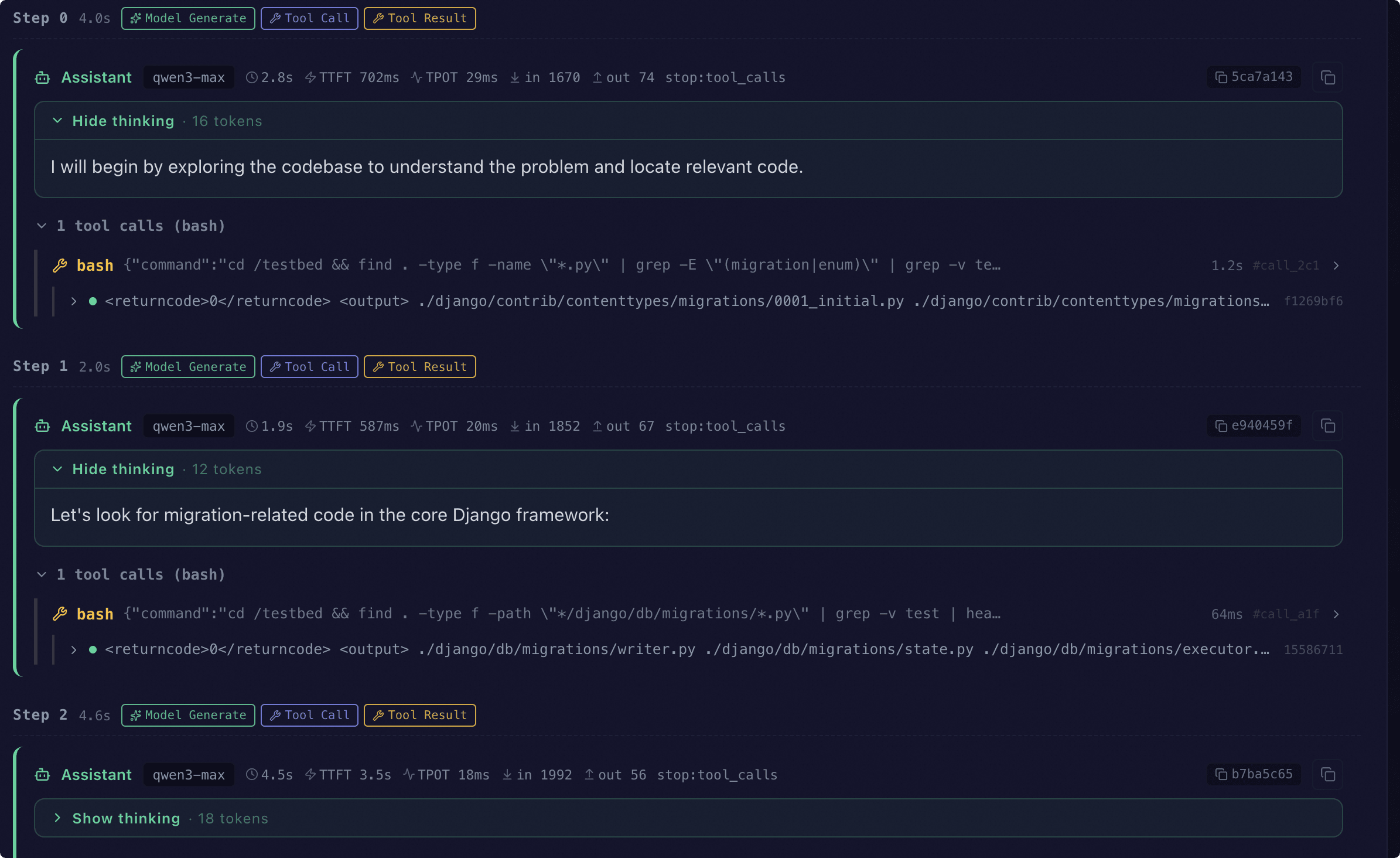
Key events of every step (model generation, tool call, tool result, environment command, error, nudge, submit) are recorded into AgentTrace.events in a structured form, and persisted alongside the evaluation result in the agent_trace field of reviews/<model_id>/<dataset>.jsonl so that the HTML report and the Web dashboard can replay them.
AgentConfig Reference#
AgentConfig is defined in evalscope.api.agent and is the value type of TaskConfig.agent_config.
Field |
Type |
Default |
Description |
|---|---|---|---|
|
|
|
Registered strategy name; controls how the model interacts with the loop |
|
|
|
Whitelist of tools available to the model. Empty list means pure multi-turn chat with no tools |
|
|
|
Registered environment name. |
|
|
|
Hard upper bound of loop iterations. Exceeding it logs |
|
|
|
Strategy constructor kwargs (e.g. |
|
|
|
Environment constructor kwargs (e.g. |
2.1 Available strategies#
Name |
Description |
|---|---|
|
Default strategy that uses the model’s native function-calling API. Auto-injects a |
|
ReAct-style strategy that injects a reasoning-first system prompt; also auto-injects the |
|
SWE-bench tool-calling protocol; only allows the |
|
SWE-bench backticks text protocol, suitable for models that do not support function-calling |
2.2 Available tools#
Name |
Description |
Requires environment |
|---|---|---|
|
Executes shell commands and returns stdout / stderr |
Yes |
|
Executes Python source code and returns stdout / stderr |
Yes |
|
Explicitly submits a final answer; auto-injected by |
No |
2.3 Available environments#
Name |
Description |
|---|---|
|
|
|
|
2.4 environment_extra fields#
local environment:
working_dir(str): working directoryenv_vars(dict[str, str]): environment variables to inject
docker environment:
image(str): Docker image name (e.g.python:3.11-slim)timeout(float): per-command timeout (seconds)environment(dict[str, str]): container environment variables
Tip
When environment='docker' is enabled, EvalScope reuses the ms-enclave infrastructure described in Sandbox Environment. Make sure the sandbox dependencies and Docker are installed first, and we recommend explicitly turning on the sandbox via TaskConfig.sandbox = SandboxTaskConfig(enabled=True, engine='docker') (see the sandbox docs for details).
2.5 extra fields#
system_prompt(str): override the strategy’s default system prompt, e.g. force the model to callpython_execfor calculations.
Running Generic Benchmarks in Agent Mode#
3.1 Case A: GSM8K + function_calling + python_exec + Docker#
Force the model to call python_exec to verify its calculations while solving GSM8K problems, with the tool running inside a Docker container.
from dotenv import dotenv_values
from evalscope import TaskConfig, run_task
from evalscope.api.agent import AgentConfig

env = dotenv_values('.env')

task_config = TaskConfig(
    model='qwen-plus',
    api_url='https://dashscope.aliyuncs.com/compatible-mode/v1',
    api_key=env.get('DASHSCOPE_API_KEY'),
    eval_type='openai_api',
    datasets=['gsm8k'],
    dataset_args={'gsm8k': {'few_shot_num': 0}},
    eval_batch_size=5,
    limit=5,
    generation_config={
        'max_tokens': 2048,
        'temperature': 0.7,
        'parallel_tool_calls': True,
    },
    agent_config=AgentConfig(
        strategy='function_calling',
        tools=['python_exec'],
        environment='docker',
        environment_extra={'image': 'python:3.11-slim', 'timeout': 60},
        max_steps=5,
        extra={
            'system_prompt': (
                'You are a math solver. '
                'Use the python_exec tool to verify your calculations.'
            ),
        },
    ),
)

run_task(task_config)
After a successful run, every record in reviews/qwen-plus/gsm8k_*.jsonl will have an agent_trace field that satisfies:
agent_trace.strategy == 'function_calling'agent_trace.environment == 'docker'agent_trace.eventscontains at leastmodel_generate; whenever the model actually calls a tool, pairedtool_call/tool_resultevents appear.
3.2 Case B: AIME + react + bash + local#
The ReAct strategy makes the model reason before acting and lets it call bash inside a local subprocess sandbox.
from dotenv import dotenv_values
from evalscope import TaskConfig, run_task
from evalscope.api.agent import AgentConfig

env = dotenv_values('.env')

task_config = TaskConfig(
    model='qwen-plus',
    api_url='https://dashscope.aliyuncs.com/compatible-mode/v1',
    api_key=env.get('DASHSCOPE_API_KEY'),
    eval_type='openai_api',
    datasets=['aime26'],
    dataset_args={'aime26': {'few_shot_num': 0}},
    eval_batch_size=5,
    limit=5,
    generation_config={
        'max_tokens': 2048,
        'temperature': 0.7,
        'parallel_tool_calls': True,
    },
    agent_config=AgentConfig(
        strategy='react',
        tools=['bash'],
        environment='local',
        max_steps=10,
    ),
)

run_task(task_config)
Expected outputs:
agent_trace.strategy == 'react',agent_trace.environment == 'local'agent_trace.eventscontains at leastmodel_generate; pairedtool_call/tool_resultevents appear when the model invokes a tool, and a singlenudgemay appear when it does not.
Tip
The
localenvironment has no filesystem isolation; only use it for development. For production, switch todocker.agent_configalso accepts a plain dict — TaskConfig converts it to anAgentConfiginstance automatically.
SWE-bench Agentic Cases#
The swe_bench_*_agentic family of benchmarks (swe_bench_verified_agentic, swe_bench_verified_mini_agentic, swe_bench_lite_agentic) is driven directly by AgentLoopAdapter subclasses and does not read TaskConfig.agent_config. All loop parameters are passed via extra_params under dataset_args.
4.1 extra_params reference#
Parameter |
Type |
Default |
Choices |
Description |
|---|---|---|---|---|
|
|
|
|
Agent protocol. |
|
|
|
- |
Max agent steps per sample |
|
|
|
- |
Default timeout (seconds) per bash command |
|
|
|
- |
Working directory inside the container |
|
|
|
- |
Whether to build per-sample Docker images locally |
|
|
|
- |
Whether to try pulling remote images before building |
|
|
|
|
Force a specific build/pull architecture. Empty string means use the host architecture |
4.2 Full example#
The following corresponds to the swe_bench_verified_mini_agentic configuration in tests/benchmark/test_agent.py, evaluating the first 3 samples.
from dotenv import dotenv_values
from evalscope import TaskConfig, run_task

env = dotenv_values('.env')

task_config = TaskConfig(
    model='qwen-plus',
    api_url='https://dashscope.aliyuncs.com/compatible-mode/v1',
    api_key=env.get('DASHSCOPE_API_KEY'),
    eval_type='openai_api',
    datasets=['swe_bench_verified_mini_agentic'],
    dataset_args={
        'swe_bench_verified_mini_agentic': {
            'extra_params': {
                'action_protocol': 'toolcall',
                'max_steps': 250,
                'command_timeout': 60.0,
                'working_dir': '/testbed',
                'build_docker_images': True,
                'pull_remote_images_if_available': True,
            },
        },
    },
    eval_batch_size=2,
    limit=3,
    generation_config={
        'max_tokens': 4096,
        'temperature': 0.0,
    },
)

run_task(task_config)
Important
Prerequisites:
pip install evalscope[swe_bench], and make sure Docker is installed and running.If
agent_configis also configured, the global config is ignored by swe_bench agentic benchmarks; tune the loop viaextra_paramsinstead.For sandbox images and remote managers, see Sandbox Environment.
For dataset details, see the SWE-bench benchmark docs.
Trace Visualization#
When Agent mode is enabled, every sample’s evaluation result carries an agent_trace field. EvalScope’s Web dashboard can replay the full agent trajectory step by step:
Start the Web service:
evalscope service --outputs ./outputsPick the target report from the dashboard, then go to the Single Model Detail → Predictions tab
The dashboard detects
agent_traceand automatically renders an Agent Trace view grouped bystep
The view shows the following core elements in chronological order:
Assistant replies: model output, reasoning, per-step latency and token usage
Tool calls and tool results: aggregated
tool_calland the corresponding observations within the same stepEnvironment commands: actual shell / python_exec commands dispatched into the sandbox
Nudge / Error notices: system reminders when the model did not call a tool, plus parsing errors and tool exceptions
Event pills: compact display of
model_generate / tool_call / tool_result / env_exec / nudge / error / submitevents with elapsed time and token counts
See also
For the full visualization guide (dashboard, report comparison, predictions view, etc.), see Visualization.
FAQ#
Q1: When should I use the global agent_config versus benchmark-built-in AgentLoop?
Want a regular benchmark (GSM8K, AIME, IFEval, HLE, etc.) to run as a multi-turn tool-calling task → set
TaskConfig.agent_config.Evaluating a benchmark that is intrinsically agentic (SWE-bench agentic, Terminal-Bench, etc.) → just run the dataset and tune
dataset_args.extra_params; you do not need to (and should not) setagent_config(it will be ignored).
Q2: The model never calls any tool. How do I debug?
Verify the tool names in
agent_config.tools(see section 2.2).Make sure the model supports function-calling. Otherwise switch to a text protocol such as
swe_bench_backticks.Inspect
agent_trace.eventsfornudge(model was reminded but still did not call a tool) orerror(parsing / tool execution failed).Force the model to use a tool via
extra={'system_prompt': '...'}.
Q3: What value of max_steps should I pick?
Math / simple QA benchmarks:
3–10is usually enough.Code-repair / SWE-bench style benchmarks: keep the default
250. A lower value can produce manymax_steps_exceededevents.
Q4: I get Docker-related errors with environment='docker'. What now?
Make sure Docker is installed and running locally (see Sandbox Environment).
If the first image pull fails, try
docker pull <image>manually before re-running the evaluation.A remote Docker daemon can be reached via
TaskConfig.sandbox.manager_config = {'base_url': 'http://<host>:<port>'}.