

Evaluating in the Wild: How Agentic Is Your AI Model Really?#
In the evolution of large language models from simple “conversationalists” to “autonomous agents,” Function Calling / Tool Use capability is absolutely core.
However, in practical development, developers frequently face this pain point: models claim to “support tool calling,” but their performance in real business scenarios leaves much to be desired—either randomly calling APIs during casual user chats, or generating JSON parameters with missing fields, causing frequent backend service errors.
So how do you issue a qualified “tool driving license” to your model’s interface calling capabilities? What are the testing standards? How should the evaluation process be designed?
Such assessments depend not only on the model’s inherent capabilities but are also significantly influenced by differences in service providers’ inference implementations, post-processing logic, and prompt engineering. These factors all lead to variations in actual integration effectiveness. Even with local deployment, the choice of inference engine or differences in model quantization precision directly interfere with tool calling capabilities, thereby affecting final implementation results. For example, Moonshot AI specifically launched validation standards for its K2 model, aiming to help developers evaluate and compare the actual performance of different API providers in tool-call scenarios.
We believe such objective evaluation is not limited to any specific model, but is a capability needed by every developer building practical applications based on large language models. This article will introduce how to use the EvalScope evaluation framework to conduct quantitative assessments of whether models “can use tools and can use them well” through a universal, out-of-the-box best practice.
1. Why Is Tool Calling Evaluation So Important?#
In traditional evaluations, we often focus on model performance in knowledge Q&A, logical reasoning, or text generation quality. But in the Agent era, evaluation criteria have undergone a qualitative shift: from focusing on “making sense” to focusing on “executing flawlessly.” Models must not only understand human language but also speak “machine language” precisely.
According to the industry status revealed by MoonshotAI’s open-source K2-Vendor-Verifier project, many models have two fatal flaws when handling tool calls:
Blurred Decision Boundaries (Call vs. Not Call): Models cannot distinguish between “user is chatting” and “user is giving instructions.” For example, when a user says “nice weather today,” the model shouldn’t attempt to call a weather API, but many models incorrectly trigger it.
Parameter Hallucination (Schema Violation): Generated parameters often miss required fields or have type errors (e.g., passing strings to numeric fields), causing API calls to fail directly.
If these two problems cannot be solved, the constructed Agent can never go online. Therefore, we need a deterministic, regressive evaluation process that tests not only “whether it can call” but also “whether it should call” and “whether parameters are correct.”
2. Our Solution#
To address the above pain points, the EvalScope framework integrates a standardized GeneralFunctionCall evaluation flow. We referenced MoonshotAI K2’s validation logic, encapsulated it as an easy-to-use evaluation tool, and made extensions for generalizability.
The core value of this solution lies in:
Dual Verification Mechanism: Verifies both decision accuracy (whether the model correctly determined if tools should be called) and parameter legality (whether generated JSON perfectly conforms to Schema definitions).
High-Quality, Extensible Benchmark Data: Supports both direct use of standard pre-synthesized data and custom evaluation data.
Automated Metric Calculation: Directly outputs F1 Score and Schema pass rate without manual intervention.
3. Quick Start Guide#
This section will guide you on how to evaluate your model using preset datasets or custom business data.
Before this, you need to install the EvalScope library by running the following code:
pip install 'evalscope[app]' -U
1. Prepare Data#
To make the evaluation tool “targeted,” we need to prepare data in standard JSONL format.
Each line represents a test sample with three core fields:
messages: Conversation context.tools: Available tool definitions for the model (toolbox).should_call_tool: This is the key label. It tells the evaluator whether the standard answer in this context is “call tool (True)” or “reply directly (False).”
Standard Data Sample Example:
{
  "messages": [
    { "role": "system", "content": "You are an assistant" },
    { "role": "user", "content": "Convert 37 degrees Celsius to Fahrenheit" }
  ],
  "tools": [
    {
      "type": "function",
      "function": {
        "name": "convert_temperature",
        "description": "Temperature conversion",
        "parameters": {
          "type": "object",
          "properties": {
             "celsius": { "type": "number", "description": "Celsius temperature" }
          },
          "required": ["celsius"],
          "additionalProperties": false
        }
      }
    }
  ],
  "should_call_tool": true
}
💡 Tip:
To test the model’s “anti-interference capability,” be sure to include negative samples with
should_call_tool: false(e.g., user is just greeting).If you don’t have your own data, you can directly use EvalScope’s preset evalscope/GeneralFunctionCall-Test dataset.
2. Run Evaluation#
We have greatly simplified code complexity. It’s recommended to evaluate models through API access (closest to real production environment).
Scenario A: Using Preset Dataset (Recommended for First Experience)
This uses the preset dataset evalscope/GeneralFunctionCall-Test, organized from MoonshotAI’s open-source samples. The core “whether to trigger tool” label is generated by the K2-Thinking model. This ensures evaluation standard consistency, greatly facilitating developers’ experiment reproduction and automated regression testing.
from evalscope import TaskConfig, run_task
import os

# Configure evaluation task
task_cfg = TaskConfig(
    model='qwen-plus',  # Model name under test
    api_url='https://dashscope.aliyuncs.com/compatible-mode/v1', # OpenAI-compatible API address
    api_key=os.getenv('DASHSCOPE_API_KEY'), # Get Key from environment variable
    datasets=['general_fc'],  # Core parameter: specify 'general_fc' evaluation mode, uses evalscope/GeneralFunctionCall-Test by default
)

# Start task, automatically print results
run_task(task_cfg=task_cfg)
Scenario B: Using Custom Business Data
If your business scenario is special (e.g., finance, healthcare), it’s recommended to establish your own test set.
First, create a file named example.jsonl with the following content (including positive and negative samples):
{"messages":[{"role":"system","content":"You are an assistant"},{"role":"user","content":"Please add 2 and 3"}],"tools":[{"type":"function","function":{"name":"add","description":"Add two numbers","parameters":{"type":"object","properties":{"a":{"type":"number","description":"First number"},"b":{"type":"number","description":"Second number"}},"required":["a","b"],"additionalProperties":false}}}],"should_call_tool":true}
{"messages":[{"role":"system","content":"You are an assistant"},{"role":"user","content":"Nice weather today, let's chat"}],"tools":[{"type":"function","function":{"name":"add","description":"Add two numbers","parameters":{"type":"object","properties":{"a":{"type":"number","description":"First number"},"b":{"type":"number","description":"Second number"}},"required":["a","b"],"additionalProperties":false}}}],"should_call_tool":false}
{"messages":[{"role":"system","content":"You are an assistant"},{"role":"user","content":"Convert 37 degrees Celsius to Fahrenheit"}],"tools":[{"type":"function","function":{"name":"convert_temperature","description":"Convert Celsius to Fahrenheit","parameters":{"type":"object","properties":{"celsius":{"type":"number","description":"Celsius temperature value"}},"required":["celsius"],"additionalProperties":false}}}],"should_call_tool":true}
Save the above file to custom_eval/text/fc/example.jsonl, then run the following code:
from evalscope import TaskConfig, run_task
import os

task_cfg = TaskConfig(
    model='qwen-plus',
    api_url='https://dashscope.aliyuncs.com/compatible-mode/v1',
    api_key=os.getenv('DASHSCOPE_API_KEY'),
    datasets=['general_fc'],
    # Inject local data path through dataset_args
    dataset_args={
        'general_fc': {
            "local_path": "custom_eval/text/fc",  # Folder path where your JSONL file is located
            "subset_list": ["example"]            # Corresponding filename (without extension)
        }
    },
)

run_task(task_cfg=task_cfg)
3. Interpret Report#
After evaluation completion, the console will output a metrics report. You need to focus on the following four core metrics:
Metric Name |
Meaning |
Description |
|---|---|---|
|
Decision F1 Score |
Measures whether the model is “clear-headed.” Low scores indicate the model often calls tools when unnecessary or doesn’t respond when it should. This is the first threshold for Agent intelligence. |
|
Parameter Format Accuracy |
Measures whether the model’s generated JSON parameters conform to Schema definitions. If this is low, the model often produces “hallucinated parameters,” causing code crashes. |
|
Trigger Call Count |
Total number of times the model predicted tool calls were needed. |
|
Perfect Call Count |
Number of samples with both correct decisions and completely correct parameters. |
Result Example:
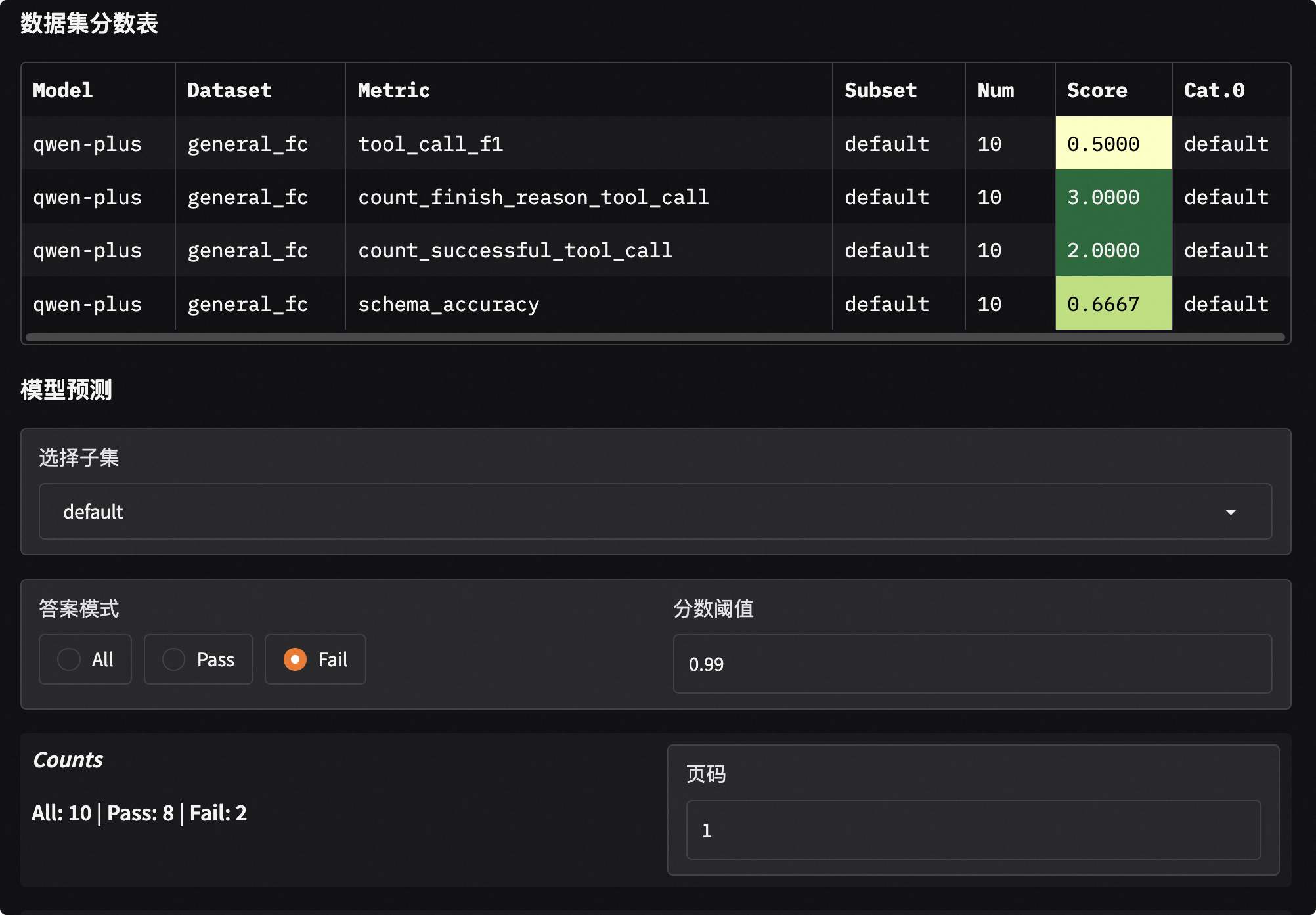
+-----------+------------+-------------------------------+----------+-------+---------+
| Model     | Dataset    | Metric                        | Subset   |   Num |   Score |
+===========+============+===============================+==========+=======+=========+
| modeltest | general_fc | count_finish_reason_tool_call | default  |    10 |  3      |
+-----------+------------+-------------------------------+----------+-------+---------+
| modeltest | general_fc | count_successful_tool_call    | default  |    10 |  2      |
+-----------+------------+-------------------------------+----------+-------+---------+
| modeltest | general_fc | schema_accuracy               | default  |    10 |  0.6667 |
+-----------+------------+-------------------------------+----------+-------+---------+
| modeltest | general_fc | tool_call_f1                  | default  |    10 |  0.5    |
+-----------+------------+-------------------------------+----------+-------+---------+
Brief Commentary: In this example, 10 requests were sent in total. The model triggered 3 tool calls (count_finish_reason_tool_call), but only 2 were completely successful (count_successful_tool_call).
Problem Analysis:
schema_accuracyis 0.6667, indicating one call was triggered but had incorrect parameter format (possibly missing fields or wrong types);tool_call_f1is only 0.5, indicating serious misjudgment in the “should call or not” decision (missed calls or false calls).Improvement Suggestions: This model may need fine-tuning with more samples containing complex Schemas, or optimize System instructions in Prompts to clarify tool calling boundaries.
Visualization:
EvalScope has built-in visualization analysis tools that make it very convenient to view detailed information for each sample. No additional code needed—just run one command in the terminal to start a local service:
evalscope app
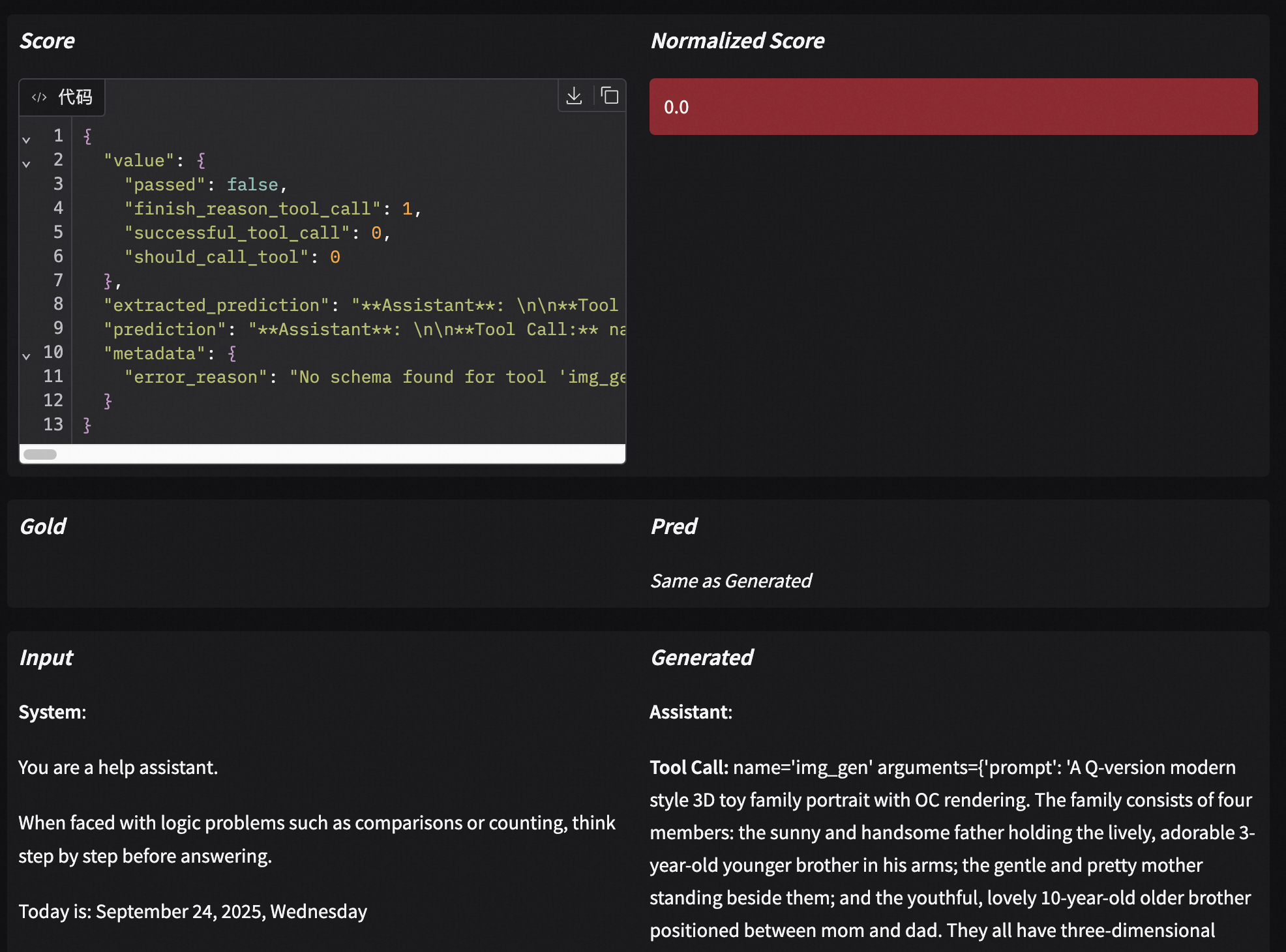
Open your browser and visit http://127.0.0.1:7860 to view model score distributions and responses and scores for each question:
4. Summary#
Tool calling capability is the bridge connecting LLMs to the real world. By introducing EvalScope’s validation standards for tool calling accuracy and effectiveness, we no longer rely on subjective feelings to evaluate models, but let data speak.
This best practice not only helps you select the most suitable model for your business but also serves as a “ruler” for subsequent model fine-tuning or Prompt optimization, ensuring your Agent capabilities steadily improve.
Now, use this toolkit to give your model a comprehensive checkup!