

Examples#
Using Local Model Inference#
This project supports inference using local transformers and vllm (vllm needs to be installed first). The --model can be filled with a modelscope model name, such as Qwen/Qwen2.5-0.5B-Instruct; or you can directly specify the model weight path, such as /path/to/model_weights, without needing to specify the --url parameter.
Inference using transformers
evalscope perf \
 --model 'Qwen/Qwen2.5-0.5B-Instruct' \
 --attn-implementation flash_attention_2 \  # Optional, or choose from [flash_attention_2|eager|sdpa]
 --number 20 \
 --parallel 2 \
 --api local \
 --dataset openqa
Inference using vllm
evalscope perf \
 --model 'Qwen/Qwen2.5-0.5B-Instruct' \
 --number 20 \
 --parallel 2 \
 --api local_vllm \
 --dataset openqa
Using prompt#
evalscope perf \
 --url 'http://127.0.0.1:8000/v1/chat/completions' \
 --parallel 2 \
 --model 'qwen2.5' \
 --log-every-n-query 10 \
 --number 20 \
 --api openai \
 --temperature 0.9 \
 --max-tokens 1024 \
 --prompt 'Write a science fiction story, please begin your performance'
You can also use a local file as a prompt:
evalscope perf \
 --url 'http://127.0.0.1:8000/v1/chat/completions' \
 --parallel 2 \
 --model 'qwen2.5' \
 --log-every-n-query 10 \
 --number 20 \
 --api openai \
 --temperature 0.9 \
 --max-tokens 1024 \
 --prompt @prompt.txt
Complex Requests#
Using stop, stream, temperature, etc.:
evalscope perf \
 --url 'http://127.0.0.1:8000/v1/chat/completions' \
 --parallel 2 \
 --model 'qwen2.5' \
 --log-every-n-query 10 \
 --read-timeout 120 \
 --connect-timeout 120 \
 --number 20 \
 --max-prompt-length 128000 \
 --min-prompt-length 128 \
 --api openai \
 --temperature 0.7 \
 --max-tokens 1024 \
 --stop '<|im_end|>' \
 --dataset openqa \
 --stream
Using query-template#
You can set request parameters in the query-template:
evalscope perf \
 --url 'http://127.0.0.1:8000/v1/chat/completions' \
 --parallel 2 \
 --model 'qwen2.5' \
 --log-every-n-query 10 \
 --read-timeout 120 \
 --connect-timeout 120 \
 --number 20 \
 --max-prompt-length 128000 \
 --min-prompt-length 128 \
 --api openai \
 --query-template '{"model": "%m", "messages": [{"role": "user","content": "%p"}], "stream": true, "skip_special_tokens": false, "stop": ["<|im_end|>"], "temperature": 0.7, "max_tokens": 1024}' \
 --dataset openqa
Where %m and %p will be replaced by the model name and the prompt.
You can set request parameters in the query-template:
{
   "model":"%m",
   "messages":[
      {
         "role":"user",
         "content":"%p"
      }
   ],
   "stream":true,
   "skip_special_tokens":false,
   "stop":[
      "<|im_end|>"
   ],
   "temperature":0.7,
   "max_tokens":1024
}
evalscope perf \
 --url 'http://127.0.0.1:8000/v1/chat/completions' \
 --parallel 2 \
 --model 'qwen2.5' \
 --log-every-n-query 10 \
 --read-timeout 120 \
 --connect-timeout 120 \
 --number 20 \
 --max-prompt-length 128000 \
 --min-prompt-length 128 \
 --api openai \
 --query-template @template.json \
 --dataset openqa
Using the Random Dataset#
Randomly generate prompts based on prefix-length, max-prompt-length, and min-prompt-length. It is necessary to specify tokenizer-path. The number of tokens in the generated prompt is uniformly distributed between prefix_length + min-prompt-length and prefix_length + max-prompt-length. In a single test, all requests have the same prefix portion.
Note
Due to the influence of chat_template and tokenization algorithms, there may be some discrepancies in the number of tokens in the generated prompts, and it is not an exact specified token count.
Execute the following command:
evalscope perf \
  --parallel 20 \
  --model Qwen2.5-0.5B-Instruct \
  --url http://127.0.0.1:8801/v1/chat/completions \
  --api openai \
  --dataset random \
  --min-tokens 128 \
  --max-tokens 128 \
  --prefix-length 64 \
  --min-prompt-length 1024 \
  --max-prompt-length 2048 \
  --number 100 \
  --tokenizer-path Qwen/Qwen2.5-0.5B-Instruct \
  --debug
Note
To ensure the server receives exactly the configured number of tokens, add --tokenize-prompt. This flag tokenizes the prompt into a token-ID list on the client side and sends it directly via the prompt field of /v1/completions, bypassing server-side re-tokenization.
The server will receive exactly prefix_length + inner_seq_length tokens, which falls within [min-prompt-length, max-prompt-length]. Compatible with vLLM, SGLang, LMDeploy, and other frameworks that accept token-ID input; not supported for the random_vl dataset.
Using the Random Multimodal Dataset#
Use the random_vl dataset to randomly generate image and text inputs. Based on the random dataset, it adds image-related parameters (image-width, image-height, image-format, image-num).
evalscope perf \
  --parallel 20 \
  --model Qwen2.5-VL-3B-Instruct \
  --url http://127.0.0.1:8801/v1/chat/completions \
  --api openai \
  --dataset random_vl \
  --min-tokens 128 \
  --max-tokens 128 \
  --prefix-length 0 \
  --min-prompt-length 100 \
  --max-prompt-length 100 \
  --image-width 512 \
  --image-height 512 \
  --image-format RGB \
  --image-num 1 \
  --number 100 \
  --tokenizer-path Qwen/Qwen2.5-VL-3B-Instruct \
  --debug
Embedding Model Stress Testing#
Use openai_embedding API mode and random_embedding dataset for stress testing. When using the random dataset, you need to specify tokenizer-path to generate query of specified length.
evalscope perf \
 --parallel 2 \
 --number 10 \
 --model 'text-embedding-v4' \
 --url 'https://dashscope.aliyuncs.com/compatible-mode/v1/embeddings' \
 --api-key ${DASHSCOPE_API_KEY} \
 --api openai_embedding \
 --dataset random_embedding \
 --min-prompt-length 256 \
 --max-prompt-length 256 \
 --tokenizer-path 'Qwen/Qwen3-Embedding-0.6B'
Rerank Model Stress Testing#
Use openai_rerank API mode and random_rerank dataset for stress testing. When using the random dataset, you need to specify tokenizer-path to generate query of specified length.
You can specify data generation parameters through extra-args:
num_documents: Number of documents per querydocument_length_ratio: Document length multiplier relative to query length
evalscope perf \
 --parallel 2 \
 --number 10 \
 --model 'qwen3-rerank' \
 --url 'https://dashscope.aliyuncs.com/compatible-api/v1/reranks' \
 --api-key ${DASHSCOPE_API_KEY} \
 --api openai_rerank \
 --dataset random_rerank \
 --min-prompt-length 256 \
 --max-prompt-length 256 \
 --tokenizer-path 'Qwen/Qwen3-Embedding-0.6B' \
 --extra-args '{"num_documents": 5, "document_length_ratio": 3}'
Visualizing Test Results#
Using WandB#
Please install wandb using the following command:
pip install wandb
Add the following parameters before starting the test:
--visualizer wandb
--name 'name_of_wandb_log'

Using SwanLab#
Please install SwanLab using the following command:
pip install swanlab
Add the following parameters before starting the test:
# You can use the SWANLAB_PROJ_NAME environment variable to specify the project name
--visualizer swanlab
--name 'name_of_swanlab_log'

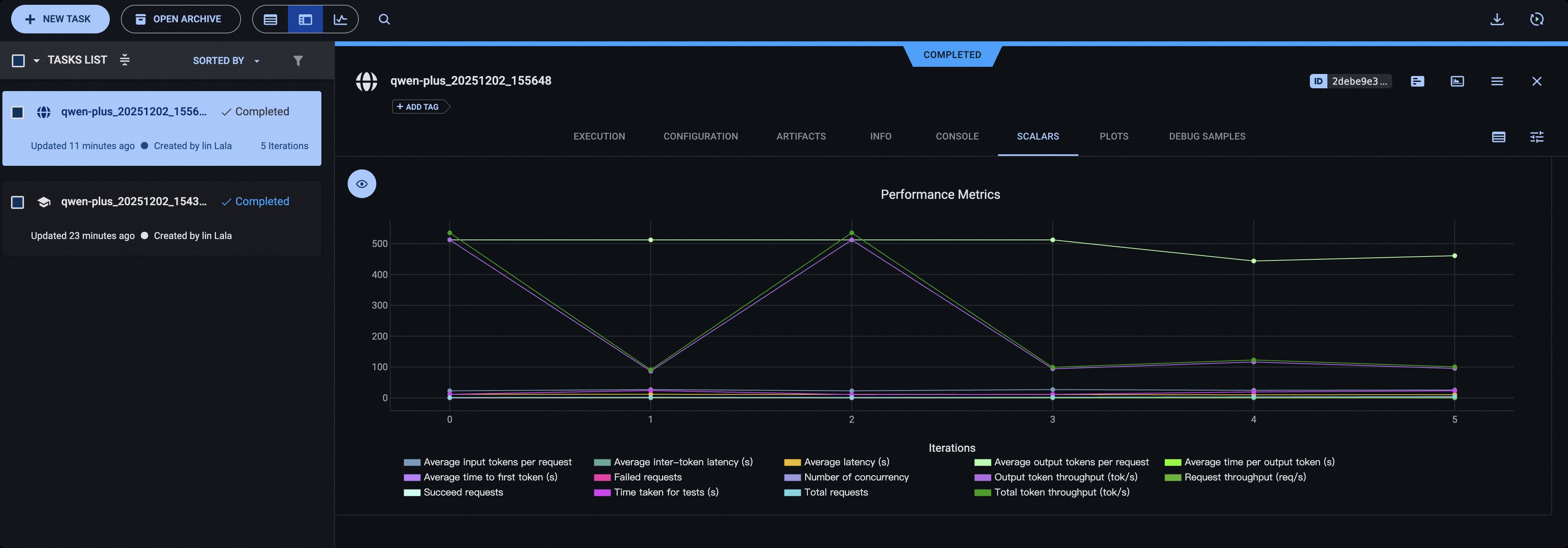
Using ClearML#
Please install ClearML using the following command:
pip install clearml
Initialize the ClearML server:
clearml-init
Add the following parameters before starting the test:
# You can use the CLEARML_PROJECT_NAME environment variable to specify the project name
--visualizer clearml
--name 'name_of_clearml_task'
Open-loop Mode#
In open-loop mode, requests are dispatched immediately following a Poisson arrival schedule (controlled by --rate), without waiting for the server to return responses. This models realistic traffic patterns where arrivals are independent of service time. By specifying multiple rate values in a single command, you can automatically sweep the throughput-latency curve.
The following example runs three independent benchmark rounds at 5, 10, and 20 req/s, sending 500, 1000, and 2000 requests respectively, to observe how latency and throughput change under different loads:
evalscope perf \
  --url 'http://127.0.0.1:8000/v1/chat/completions' \
  --model 'qwen2.5' \
  --api openai \
  --dataset openqa \
  --open-loop \
  --rate 5 10 20 \
  --number 500 1000 2000 \
  --max-tokens 1024 \
  --stream
Note
Important Notes
All
--ratevalues must be > 0;rate=-1(unlimited) is not supported in open-loop mode.--numberand--ratemust have the same length; each(rate, number)pair corresponds to one independent benchmark run.--parallelis ignored in open-loop mode (internally set to INF); no need to specify it.Since concurrency is unbounded, a high rate may cause a large number of in-flight requests to accumulate if the server cannot keep up. Set rate limits according to your server’s capacity.
Core difference from closed-loop (default) mode: closed-loop workers wait for a response before sending the next request (backpressure protection); open-loop fires requests on schedule without waiting (closer to real traffic).
Debugging Requests#
Use the --debug option to output the requests and responses.
Non-stream Mode Output Example
2024-11-27 11:25:34,161 - evalscope - http_client.py - on_request_start - 116 - DEBUG - Starting request: <TraceRequestStartParams(method='POST', url=URL('http://127.0.0.1:8000/v1/completions'), headers=<CIMultiDict('Content-Type': 'application/json', 'user-agent': 'modelscope_bench', 'Authorization': 'Bearer EMPTY')>)>
2024-11-27 11:25:34,163 - evalscope - http_client.py - on_request_chunk_sent - 128 - DEBUG - Request sent: <method='POST',  url=URL('http://127.0.0.1:8000/v1/completions'), truncated_chunk='{"prompt": "hello", "model": "qwen2.5"}'>
2024-11-27 11:25:38,172 - evalscope - http_client.py - on_response_chunk_received - 140 - DEBUG - Request received: <method='POST',  url=URL('http://127.0.0.1:8000/v1/completions'), truncated_chunk='{"id":"cmpl-a4565eb4fc6b4a5697f38c0adaf9b70b","object":"text_completion","created":1732677934,"model":"qwen2.5","choices":[{"index":0,"text":",everyone!今天我给您撒个谎哦。 ))\\n\\n今天开心的事。","logprobs":null,"finish_reason":"length","stop_reason":null,"prompt_logprobs":null}],"usage":{"prompt_tokens":1,"total_tokens":17,"completion_tokens":16}}'>
stream Mode Output Example
2024-11-27 20:02:24,760 - evalscope - http_client.py - _handle_stream - 57 - DEBUG - Response recevied: data: {"model":"Qwen2.5-0.5B-Instruct","object":"chat.completion.chunk","choices":[{"index":0,"delta":{"content":"重要的"},"finish_reason":null}],"usage":null}
2024-11-27 20:02:24,803 - evalscope - http_client.py - _handle_stream - 57 - DEBUG - Response recevied: data: {"model":"Qwen2.5-0.5B-Instruct","object":"chat.completion.chunk","choices":[{"index":0,"delta":{"content":""},"finish_reason":null}],"usage":null}
2024-11-27 20:02:24,847 - evalscope - http_client.py - _handle_stream - 57 - DEBUG - Response recevied: data: {"model":"Qwen2.5-0.5B-Instruct","object":"chat.completion.chunk","choices":[{"index":0,"delta":{"content":",以便"},"finish_reason":null}],"usage":null}
2024-11-27 20:02:24,890 - evalscope - http_client.py - _handle_stream - 57 - DEBUG - Response recevied: data: {"model":"Qwen2.5-0.5B-Instruct","object":"chat.completion.chunk","choices":[{"index":0,"delta":{"content":"及时"},"finish_reason":null}],"usage":null}
2024-11-27 20:02:24,933 - evalscope - http_client.py - _handle_stream - 57 - DEBUG - Response recevied: data: {"model":"Qwen2.5-0.5B-Instruct","object":"chat.completion.chunk","choices":[{"index":0,"delta":{"content":"得到"},"finish_reason":null}],"usage":null}
2024-11-27 20:02:24,976 - evalscope - http_client.py - _handle_stream - 57 - DEBUG - Response recevied: data: {"model":"Qwen2.5-0.5B-Instruct","object":"chat.completion.chunk","choices":[{"index":0,"delta":{"content":"帮助"},"finish_reason":null}],"usage":null}
2024-11-27 20:02:25,023 - evalscope - http_client.py - _handle_stream - 57 - DEBUG - Response recevied: data: {"model":"Qwen2.5-0.5B-Instruct","object":"chat.completion.chunk","choices":[{"index":0,"delta":{"content":"和支持"},"finish_reason":null}],"usage":null}
2024-11-27 20:02:25,066 - evalscope - http_client.py - _handle_stream - 57 - DEBUG - Response recevied: data: {"model":"Qwen2.5-0.5B-Instruct","object":"chat.completion.chunk","choices":[{"index":0,"delta":{"content":""},"finish_reason":null}],"usage":null}
2024-11-27 20:02:25,109 - evalscope - http_client.py - _handle_stream - 57 - DEBUG - Response recevied: data: {"model":"Qwen2.5-0.5B-Instruct","object":"chat.completion.chunk","choices":[{"index":0,"delta":{"content":""},"finish_reason":null}],"usage":null}
2024-11-27 20:02:25,111 - evalscope - http_client.py - _handle_stream - 57 - DEBUG - Response recevied: data: {"model":"Qwen2.5-0.5B-Instruct","object":"chat.completion.chunk","choices":[{"index":0,"delta":{"content":"。<|im_end|>"},"finish_reason":null}],"usage":null}
2024-11-27 20:02:25,113 - evalscope - http_client.py - _handle_stream - 57 - DEBUG - Response recevied: data: {"model":"Qwen2.5-0.5B-Instruct","object":"chat.completion.chunk","choices":[{"index":0,"delta":{},"finish_reason":"stop"}],"usage":{"prompt_tokens":50,"completion_tokens":260,"total_tokens":310}}
2024-11-27 20:02:25,113 - evalscope - http_client.py - _handle_stream - 57 - DEBUG - Response recevied: data: [DONE]