
使用示例#
使用本地模型推理#
本项目支持本地transformers进行推理和vllm推理(需先安装vllm), --model可以填入modelscope模型名称,例如Qwen/Qwen2.5-0.5B-Instruct;也可以直接指定模型权重路径,例如/path/to/model_weights,无需指定--url参数。
1. 使用transformers进行推理
指定--api local:
evalscope perf \
 --model 'Qwen/Qwen2.5-0.5B-Instruct' \
 --attn-implementation flash_attention_2 \  # 可不填,或选[flash_attention_2|eager|sdpa]
 --number 20 \
 --parallel 2 \
 --api local \
 --dataset openqa
2. 使用vllm进行推理
指定--api local_vllm:
evalscope perf \
 --model 'Qwen/Qwen2.5-0.5B-Instruct' \
 --number 20 \
 --parallel 2 \
 --api local_vllm \
 --dataset openqa
使用prompt#
evalscope perf \
 --url 'http://127.0.0.1:8000/v1/chat/completions' \
 --parallel 2 \
 --model 'qwen2.5' \
 --log-every-n-query 10 \
 --number 20 \
 --api openai \
 --temperature 0.9 \
 --max-tokens 1024 \
 --prompt '写一个科幻小说,请开始你的表演'
也可以使用本地文件作为prompt:
evalscope perf \
 --url 'http://127.0.0.1:8000/v1/chat/completions' \
 --parallel 2 \
 --model 'qwen2.5' \
 --log-every-n-query 10 \
 --number 20 \
 --api openai \
 --temperature 0.9 \
 --max-tokens 1024 \
 --prompt @prompt.txt
复杂请求#
使用stop,stream,temperature等:
evalscope perf \
 --url 'http://127.0.0.1:8000/v1/chat/completions' \
 --parallel 2 \
 --model 'qwen2.5' \
 --log-every-n-query 10 \
 --read-timeout 120 \
 --connect-timeout 120 \
 --number 20 \
 --max-prompt-length 128000 \
 --min-prompt-length 128 \
 --api openai \
 --temperature 0.7 \
 --max-tokens 1024 \
 --stop '<|im_end|>' \
 --dataset openqa \
 --stream
使用query-template#
您可以在query-template中设置请求参数:
evalscope perf \
 --url 'http://127.0.0.1:8000/v1/chat/completions' \
 --parallel 2 \
 --model 'qwen2.5' \
 --log-every-n-query 10 \
 --read-timeout 120 \
 --connect-timeout 120 \
 --number 20 \
 --max-prompt-length 128000 \
 --min-prompt-length 128 \
 --api openai \
 --query-template '{"model": "%m", "messages": [{"role": "user","content": "%p"}], "stream": true, "skip_special_tokens": false, "stop": ["<|im_end|>"], "temperature": 0.7, "max_tokens": 1024}' \
 --dataset openqa
其中%m和%p会被替换为模型名称和prompt。
您也可以使用本地query-template.json文件:
{
   "model":"%m",
   "messages":[
      {
         "role":"user",
         "content":"%p"
      }
   ],
   "stream":true,
   "skip_special_tokens":false,
   "stop":[
      "<|im_end|>"
   ],
   "temperature":0.7,
   "max_tokens":1024
}
evalscope perf \
 --url 'http://127.0.0.1:8000/v1/chat/completions' \
 --parallel 2 \
 --model 'qwen2.5' \
 --log-every-n-query 10 \
 --read-timeout 120 \
 --connect-timeout 120 \
 --number 20 \
 --max-prompt-length 128000 \
 --min-prompt-length 128 \
 --api openai \
 --query-template @template.json \
 --dataset openqa
使用random数据集#
根据prefix-length,max-prompt-length和min-prompt-length随机生成prompt,必需指定tokenizer-path。生成prompt的token数量在prefix_length + min-prompt-length和prefix_length + max-prompt-length之间均匀分布,在一次测试中所有请求prefix部分相同。
备注
由于chat_template以及tokenize算法的影响,生成的prompt的token数量可能有些误差,不是精确的指定token数量。
执行以下命令即可:
evalscope perf \
  --parallel 20 \
  --model Qwen2.5-0.5B-Instruct \
  --url http://127.0.0.1:8801/v1/chat/completions \
  --api openai \
  --dataset random \
  --min-tokens 128 \
  --max-tokens 128 \
  --prefix-length 64 \
  --min-prompt-length 1024 \
  --max-prompt-length 2048 \
  --number 100 \
  --tokenizer-path Qwen/Qwen2.5-0.5B-Instruct \
  --debug
备注
若需要服务端收到的 token 数与配置精确匹配,可加上 --tokenize-prompt 参数。该参数将 prompt 在客户端 tokenize 为 token ID 列表后直接通过 /v1/completions 的 prompt 字段发送,绕过服务端的重新 tokenize。
服务端将收到恰好 prefix_length + inner_seq_length 个 token,落在 [min-prompt-length, max-prompt-length] 范围内。适用于 vLLM、SGLang、LMDeploy 等支持接收 token ID 的推理框架;不支持 random_vl 数据集。
使用random图文数据集#
使用random_vl数据集,随机生成图像和文本输入,在random基础上增加了图像相关参数(image-width,image-height,image-format,image-num)。
evalscope perf \
  --parallel 20 \
  --model Qwen2.5-VL-3B-Instruct \
  --url http://127.0.0.1:8801/v1/chat/completions \
  --api openai \
  --dataset random_vl \
  --min-tokens 128 \
  --max-tokens 128 \
  --prefix-length 0 \
  --min-prompt-length 100 \
  --max-prompt-length 100 \
  --image-width 512 \
  --image-height 512 \
  --image-format RGB \
  --image-num 1 \
  --number 100 \
  --tokenizer-path Qwen/Qwen2.5-VL-3B-Instruct \
  --debug
Embedding模型压测#
使用openai_embedding API模式和random_embedding数据集进行压测。使用随机数据集时需指定tokenizer-path用于生成指定长度范围的query文本。
evalscope perf \
 --parallel 2 \
 --number 10 \
 --model 'text-embedding-v4' \
 --url 'https://dashscope.aliyuncs.com/compatible-mode/v1/embeddings' \
 --api-key ${DASHSCOPE_API_KEY} \
 --api openai_embedding \
 --dataset random_embedding \
 --min-prompt-length 256 \
 --max-prompt-length 256 \
 --tokenizer-path 'Qwen/Qwen3-Embedding-0.6B'
Rerank模型压测#
使用openai_rerank API模式和random_rerank数据集进行压测。使用随机数据集时需指定tokenizer-path用于生成指定长度范围的query文本。
可以通过extra-args指定生成数据的参数:
num_documents: 每条query对应的文档数量document_length_ratio: 文档长度相对于query长度的倍数
evalscope perf \
 --parallel 2 \
 --number 10 \
 --model 'qwen3-rerank' \
 --url 'https://dashscope.aliyuncs.com/compatible-api/v1/reranks' \
 --api-key ${DASHSCOPE_API_KEY} \
 --api openai_rerank \
 --dataset random_rerank \
 --min-prompt-length 256 \
 --max-prompt-length 256 \
 --tokenizer-path 'Qwen/Qwen3-Embedding-0.6B' \
 --extra-args '{"num_documents": 5, "document_length_ratio": 3}'
Open-loop 开放环路模式#
Open-loop 模式下,请求按泊松到达调度(由 --rate 控制)立即发出,不等待服务端返回,从而模拟真实流量中请求到达与服务时间无关的场景。通过一次命令指定多个速率点,可自动扫描吞吐-延迟曲线。
以下示例在 5、10、20 req/s 三个速率点各发送 500、1000、2000 个请求,观察不同负载下的延迟与吞吐变化:
evalscope perf \
  --url 'http://127.0.0.1:8000/v1/chat/completions' \
  --model 'qwen2.5' \
  --api openai \
  --dataset openqa \
  --open-loop \
  --rate 5 10 20 \
  --number 500 1000 2000 \
  --max-tokens 1024 \
  --stream
备注
注意事项
--rate所有值必须 > 0;open-loop 模式下不支持rate=-1(无限速)。--number与--rate必须等长,每对(rate, number)对应一轮独立压测。--parallel在 open-loop 模式下被忽略(内部自动设为 INF),无需手动指定。open-loop 并发上限为无穷大,若服务端处理能力不足,在高速率下可能积压大量飞行中的请求,请根据服务端资源合理设置速率上限。
本模式与 closed-loop(默认)模式的核心区别:closed-loop 每个 worker 等待响应后再发下一条(背压保护),open-loop 不等待、按调度直接发出(更接近真实流量)。
Warmup 预热压测#
在正式压测前发送一批预热请求,消除冷启动影响(如 KV-cache 填充、JIT 编译、连接池初始化等),使性能指标更准确。
预热请求使用与正式压测相同的并发和速率发送,但不计入性能指标(延迟、吞吐、百分位等均排除预热数据)。
1. 绝对数量模式
指定预热请求的绝对数量:
evalscope perf \
  --url 'http://127.0.0.1:8000/v1/chat/completions' \
  --parallel 10 \
  --model 'qwen2.5' \
  --number 100 \
  --warmup-num 10 \
  --api openai \
  --dataset openqa \
  --stream
上述命令会先发送 10 个预热请求,再发送 100 个正式压测请求,指标仅统计后 100 个请求。
2. 比例模式
使用 0~1 之间的浮点数,按 --number 的比例计算预热数量,适用于 sweep 模式(多轮 --number 不同时自动适配):
evalscope perf \
  --url 'http://127.0.0.1:8000/v1/chat/completions' \
  --parallel 10 \
  --model 'qwen2.5' \
  --number 100 \
  --warmup-num 0.1 \
  --api openai \
  --dataset openqa \
  --stream
--warmup-num 0.1 表示预热数量为 --number 的 10%,即 max(1, int(0.1 * 100)) = 10 个预热请求。
备注
注意事项
预热请求与正式请求使用相同的数据集和请求参数。
预热期间的进度条会单独显示(
Warmup[...]),完成后自动切换到正式压测进度条(Processing[...])。多轮对话模式下,
--warmup-num表示预热的对话数量(与--number语义一致),预热对话内的所有 turn 均不计入指标。
调试请求#
使用 --debug 选项,我们将输出请求和响应,输出示例如下:
非stream模式输出示例
2024-11-27 11:25:34,161 - evalscope - http_client.py - on_request_start - 116 - DEBUG - Starting request: <TraceRequestStartParams(method='POST', url=URL('http://127.0.0.1:8000/v1/completions'), headers=<CIMultiDict('Content-Type': 'application/json', 'user-agent': 'modelscope_bench', 'Authorization': 'Bearer EMPTY')>)>
2024-11-27 11:25:34,163 - evalscope - http_client.py - on_request_chunk_sent - 128 - DEBUG - Request sent: <method='POST',  url=URL('http://127.0.0.1:8000/v1/completions'), truncated_chunk='{"prompt": "hello", "model": "qwen2.5"}'>
2024-11-27 11:25:38,172 - evalscope - http_client.py - on_response_chunk_received - 140 - DEBUG - Request received: <method='POST',  url=URL('http://127.0.0.1:8000/v1/completions'), truncated_chunk='{"id":"cmpl-a4565eb4fc6b4a5697f38c0adaf9b70b","object":"text_completion","created":1732677934,"model":"qwen2.5","choices":[{"index":0,"text":",everyone!今天我给您撒个谎哦。 ))\\n\\n今天开心的事。","logprobs":null,"finish_reason":"length","stop_reason":null,"prompt_logprobs":null}],"usage":{"prompt_tokens":1,"total_tokens":17,"completion_tokens":16}}'>
stream模式输出示例
2024-11-27 20:02:24,760 - evalscope - http_client.py - _handle_stream - 57 - DEBUG - Response recevied: data: {"model":"Qwen2.5-0.5B-Instruct","object":"chat.completion.chunk","choices":[{"index":0,"delta":{"content":"重要的"},"finish_reason":null}],"usage":null}
2024-11-27 20:02:24,803 - evalscope - http_client.py - _handle_stream - 57 - DEBUG - Response recevied: data: {"model":"Qwen2.5-0.5B-Instruct","object":"chat.completion.chunk","choices":[{"index":0,"delta":{"content":""},"finish_reason":null}],"usage":null}
2024-11-27 20:02:24,847 - evalscope - http_client.py - _handle_stream - 57 - DEBUG - Response recevied: data: {"model":"Qwen2.5-0.5B-Instruct","object":"chat.completion.chunk","choices":[{"index":0,"delta":{"content":",以便"},"finish_reason":null}],"usage":null}
2024-11-27 20:02:24,890 - evalscope - http_client.py - _handle_stream - 57 - DEBUG - Response recevied: data: {"model":"Qwen2.5-0.5B-Instruct","object":"chat.completion.chunk","choices":[{"index":0,"delta":{"content":"及时"},"finish_reason":null}],"usage":null}
2024-11-27 20:02:24,933 - evalscope - http_client.py - _handle_stream - 57 - DEBUG - Response recevied: data: {"model":"Qwen2.5-0.5B-Instruct","object":"chat.completion.chunk","choices":[{"index":0,"delta":{"content":"得到"},"finish_reason":null}],"usage":null}
2024-11-27 20:02:24,976 - evalscope - http_client.py - _handle_stream - 57 - DEBUG - Response recevied: data: {"model":"Qwen2.5-0.5B-Instruct","object":"chat.completion.chunk","choices":[{"index":0,"delta":{"content":"帮助"},"finish_reason":null}],"usage":null}
2024-11-27 20:02:25,023 - evalscope - http_client.py - _handle_stream - 57 - DEBUG - Response recevied: data: {"model":"Qwen2.5-0.5B-Instruct","object":"chat.completion.chunk","choices":[{"index":0,"delta":{"content":"和支持"},"finish_reason":null}],"usage":null}
2024-11-27 20:02:25,066 - evalscope - http_client.py - _handle_stream - 57 - DEBUG - Response recevied: data: {"model":"Qwen2.5-0.5B-Instruct","object":"chat.completion.chunk","choices":[{"index":0,"delta":{"content":""},"finish_reason":null}],"usage":null}
2024-11-27 20:02:25,109 - evalscope - http_client.py - _handle_stream - 57 - DEBUG - Response recevied: data: {"model":"Qwen2.5-0.5B-Instruct","object":"chat.completion.chunk","choices":[{"index":0,"delta":{"content":""},"finish_reason":null}],"usage":null}
2024-11-27 20:02:25,111 - evalscope - http_client.py - _handle_stream - 57 - DEBUG - Response recevied: data: {"model":"Qwen2.5-0.5B-Instruct","object":"chat.completion.chunk","choices":[{"index":0,"delta":{"content":"。<|im_end|>"},"finish_reason":null}],"usage":null}
2024-11-27 20:02:25,113 - evalscope - http_client.py - _handle_stream - 57 - DEBUG - Response recevied: data: {"model":"Qwen2.5-0.5B-Instruct","object":"chat.completion.chunk","choices":[{"index":0,"delta":{},"finish_reason":"stop"}],"usage":{"prompt_tokens":50,"completion_tokens":260,"total_tokens":310}}
2024-11-27 20:02:25,113 - evalscope - http_client.py - _handle_stream - 57 - DEBUG - Response recevied: data: [DONE]
可视化测试结果#
使用WandB#
请使用如下命令安装wandb:
pip install wandb
启动测试前添加如下参数:
--visualizer wandb
--name 'name_of_wandb_log'

使用SwanLab#
请使用如下命令安装SwanLab:
pip install swanlab
启动测试前添加如下参数:
# 可使用 SWANLAB_PROJ_NAME 环境变量指定项目名称
--visualizer swanlab
--name 'name_of_swanlab_log'

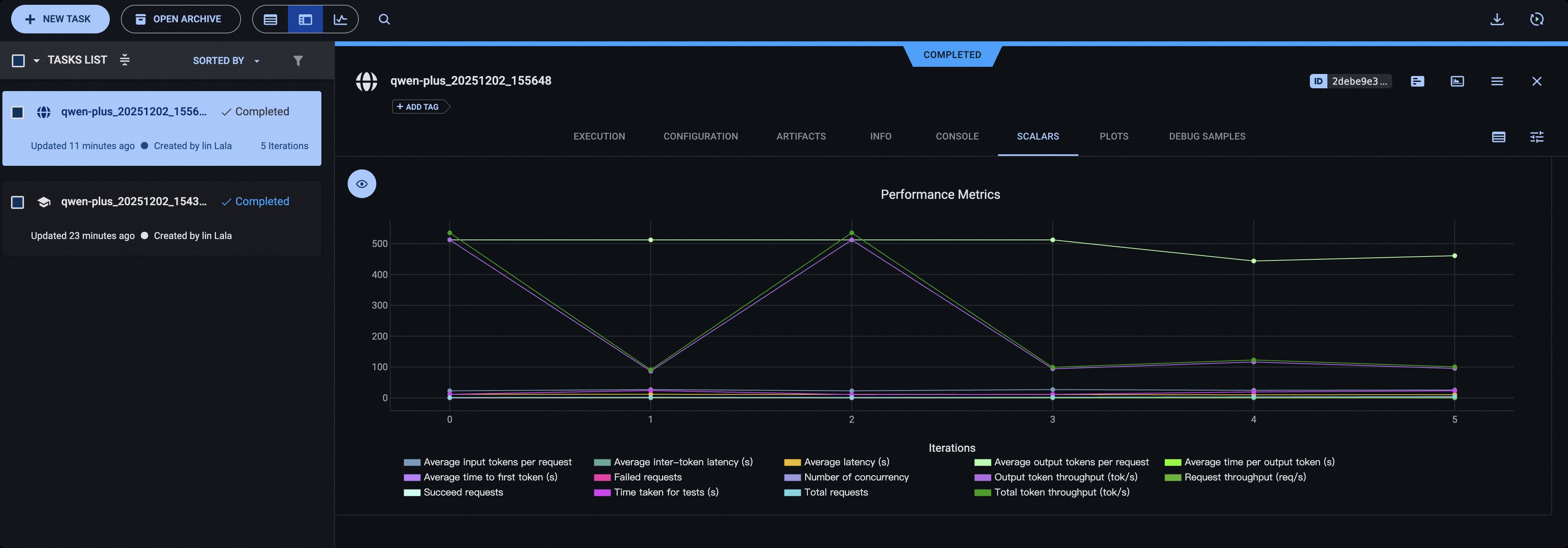
使用ClearML#
请使用如下命令安装ClearML:
pip install clearml
初始化ClearML服务器:
clearml-init
启动测试前添加如下参数:
# 可使用 CLEARML_PROJECT_NAME 环境变量指定项目名称
--visualizer clearml
--name 'name_of_clearml_task'